
Samarth Portal – Complete Guide to India’s Student ERP and Governance Suite | समर्थ पोर्टल की पूरी जानकारी हिंदी में
The Samarth Portal is one of India’s most widely used digital platforms for higher education administration. Built as part of the National Educational Technology Forum (NETF) and the eGov Suite initiative supported by the Ministry of Education, Samarth Portal helps universities, colleges, institutes, and government departments digitize their entire academic and administrative lifecycle from admissions and course selection to examinations, results, ID cards, and student records.
If you have landed on this page searching for the Samarth Portal, Jan Samarth Portal, e-Samarth Portal, or any university-specific version such as the Samarth Student Portal, you are in the right place. This guide explains what the portal is, how it works, which universities and institutes use it, how students and staff can register and log in, and how to resolve the most common issues people face while using it.
Disclaimer
What Is Samarth Portal? | समर्थ पोर्टल क्या है?
Samarth Portal (also written as Samarth eGov, Samarth eGovernance Suite, or simply “Samarth”) is a unified digital platform designed to bring together every stage of a student’s academic journey under one roof. Instead of universities relying on scattered spreadsheets, paper forms, and disconnected software, Samarth Portal offers a single, standardized system that can be adopted by any higher education institution across India.
The word “Samarth” itself means “capable” or “empowered” in Hindi, reflecting the platform’s goal — to empower universities with modern digital infrastructure and to empower students with easy, transparent access to academic services.
At its core, Samarth Portal is an ERP (Enterprise Resource Planning) system for education. It typically includes modules for:
- Student registration and admission
- Course and subject selection
- Fee payment and receipts
- Examination form submission
- Hall ticket and admit card generation
- Internal assessment and marks entry
- Result declaration and marksheet download
- ID card generation
- Hostel and attendance management
- Scholarship processing
- Academic Bank of Credits (ABC) account linking
- Staff and employee record management
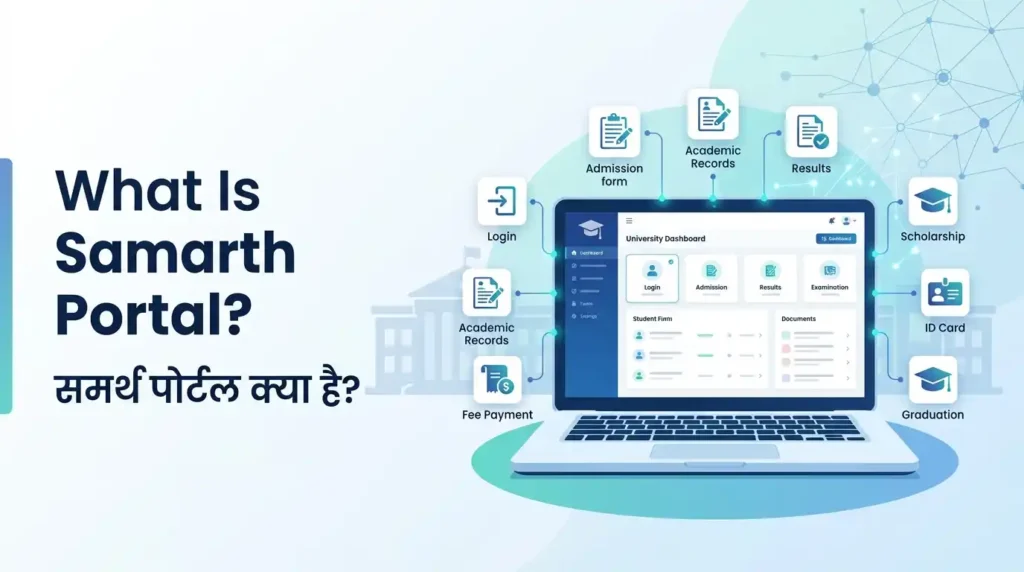
Because it is a flexible, government-backed framework, hundreds of central universities, state universities, deemed universities, IITs, NITs, and polytechnic institutions across India have adopted their own instance of Samarth Portal, each customized with their own login page, branding, and specific workflows.
Who Developed and Maintains Samarth Portal?
Samarth Portal falls under the broader eGovernance initiatives promoted by the Government of India for the education sector. It is designed to align with the goals of the National Education Policy (NEP) 2020, which emphasizes digital transformation, flexible curricula, multiple entry-exit options, and a unified academic credit system through the Academic Bank of Credits (ABC).
Because each university runs its own dedicated instance of the portal (for example, a version for Guwahati University, a version for Pondicherry University, and a version for Dr. Bhimrao Ambedkar University), the “look and feel” can vary slightly from one institution to another, but the underlying framework and core functionality remain largely consistent.
Who Built Samarth Portal? | समर्थ पोर्टल किसे बनाया?
Samarth eGov Suite was designed and developed by the University of Delhi (through its Institute of Informatics and Communication), as an initiative of the Ministry of Education, Government of India, under the National Mission on Education through Information and Communication Technology (NMEICT). The project began in 2019 with the goal of giving every Higher Education Institution (HEI) in India access to a ready-made, cloud-based ERP system without needing to build custom software from scratch.
The suite currently offers more than 40 modules organized under 9 core packages, covering everything from admissions and examinations to HR, finance, and hostel management. The official umbrella website is samarth.ac.in, but — and this is important — students almost never log in directly on samarth.ac.in itself. Instead, each participating university runs its own dedicated subdomain. For example:
- Delhi University → du.samarth.ac.in
- University of Mumbai → mu.samarth.ac.in
- Gauhati University → gauhati.samarth.ac.in
- Uttar Pradesh state institutions → uttarpradesh.samarth.ac.in
- Bihar state institutions → bihar.samarth.ac.in
So if you’re searching “Samarth Portal login,” the fastest route is always to search for your specific university’s name + samarth.ac.in, rather than trying to log in from the generic homepage.
समर्थ का फुल फॉर्म क्या है? (Full Form of Samarth)
A very common search is “Samarth full form.” The honest answer: Samarth does not have an official English acronym or full form. “समर्थ” is simply a Hindi word meaning “capable” or “empowered,” chosen as a fitting name for a platform meant to empower universities and students with digital self-service tools. The formal branded name is Samarth eGov Suite.
Why Do Universities Use Samarth Portal?
Before platforms like Samarth existed, most Indian universities managed student records manually or through fragmented, institution-specific software that didn’t talk to each other. This created major challenges:
- Long queues for admission and examination form submission
- Manual errors in result compilation
- Delayed issuance of marksheets and certificates
- Difficulty tracking student attendance and academic history
- No centralized system for staff and administrative records
Samarth Portal solves these problems by offering a ready-made, government-recommended digital backbone that any university can deploy without building software from scratch. This reduces costs, speeds up implementation, and ensures a level of standardization across institutions — which is especially useful now that students frequently transfer credits between universities under NEP 2020’s multiple entry and exit framework.
Key Features of Samarth Portal
1. Student Registration and Profile Management
New students create an account on their university’s Samarth Portal by entering personal details, academic history, and contact information. Once verified, this becomes the student’s permanent digital profile, used throughout their entire academic journey — from first-year admission to final-year convocation.
2. Course and Subject Selection
Under NEP 2020, students often have the flexibility to choose major and minor subjects, elective courses, and even interdisciplinary combinations. Samarth Portal allows students to browse available programmes, select courses within the permitted window, and confirm their choices before the deadline.
3. Examination Form Submission
One of the most searched functions of Samarth Portal is the examination form fill-up process. Students log in, verify their enrollment and course details, pay the applicable examination fee online, and submit the form. The portal then generates an acknowledgment slip and, closer to the exam date, a hall ticket or admit card.
4. Internal Assessment and Marks Entry
Faculty members use their own staff login on Samarth Portal to enter internal assessment (IA) marks, attendance records, and continuous evaluation data. Students can then view these marks directly from their own dashboard.
5. Result Declaration and Marksheet Download
Once results are finalized and approved by the examination department, they are published on Samarth Portal. Students can view their semester-wise results, download provisional marksheets, and in many cases request final marksheets or transcripts through the same system.
6. ID Card Generation
Many universities now generate digital or printable student ID cards directly through Samarth Portal, pulling the photo and details already stored in the student’s profile.
7. ABC (Academic Bank of Credits) Integration
As NEP 2020 rolls out the Academic Bank of Credits system, several Samarth Portal instances now allow students to link their ABC ID directly to their university profile, enabling seamless credit transfer if they change institutions or pursue multiple entry-exit pathways.
8. Correction Window
After submitting an examination form or admission application, students sometimes notice errors in their name, date of birth, category, or subject combination. Samarth Portal usually opens a correction window for a limited period, allowing students to fix such details before the form is locked for processing.
9. Fee Payment Gateway
Samarth Portal integrates with secure payment gateways so that admission fees, examination fees, and other dues can be paid online without visiting the university’s accounts office.
10. Staff and Employee Modules
Beyond students, Samarth Portal also supports HR-related functions for university staff — including leave applications, employee records, and administrative workflows — making it a comprehensive institutional management suite rather than just a student-facing tool.
Which Universities and Institutions Use Samarth Portal?
Because Samarth Portal is a government-promoted, institution-agnostic framework, a very large number of universities and colleges across India have adopted it as their official student and administrative portal. While each university runs a separate, independently branded version of the portal, the underlying system is the same. Below is an overview of the categories of institutions currently using Samarth Portal.
Central and State Universities
Several prominent central and state universities rely on Samarth Portal for admissions, examinations, and student records, including institutions such as Guwahati University, Gurugram University, Pondicherry University, University of Hyderabad, Central University of Rajasthan (CURAJ), Guru Ghasidas Vishwavidyalaya (GGU), Delhi Skill and Entrepreneurship University (DSEU), Dr. Bhimrao Ambedkar University (DBRAU), Agra, Central University of South Bihar, Cotton University, Central University of Tamil Nadu (CUTN), Cochin University of Science and Technology (CUSAT), Visva-Bharati University, Central University of Punjab (CUPB), and North Eastern Hill University (NEHU).
Uttar Pradesh Universities
Uttar Pradesh has one of the largest concentrations of Samarth Portal deployments among Indian states. Universities using the platform include Lucknow University (LU), Chhatrapati Shahu Ji Maharaj University, Kanpur (CSJMU), Chaudhary Charan Singh University, Meerut (CCSU), Dr. Ram Manohar Lohia Avadh University (RMLAU), Dr. Bhimrao Ambedkar University, Agra, Maharaja Suheldev State University, Veer Bahadur Singh Purvanchal University (VBSPU), Sampurnanand Sanskrit University, Deen Dayal Upadhyaya Gorakhpur University (DDUGU), Mahatma Jyotiba Phule Rohilkhand University (MJPRU), Kanpur University, Raja Mahendra Pratap Singh State University (formerly Rajju Bhaiya University), Maa Shakumbhari University, Maa Pateshwari Devi State University, Balrampur, Prof. Rajendra Singh (Rajju Bhaiya) University, Siddharth University, Kapilvastu, Allahabad State University, Harcourt Butler Technical University (HBTU), Kanpur, Madan Mohan Malaviya University of Technology (MMMUT), Gorakhpur, and Uttar Pradesh Rajarshi Tandon Open University (UPRTOU).
Uttarakhand Universities
In Uttarakhand, universities using Samarth Portal include Hemwati Nandan Bahuguna Garhwal University (HNBGU), Kumaun University, Soban Singh Jeena University, Almora (SSJU), Sridev Suman Uttarakhand University, and Doon University.
Assam Institutions
Assam has a significant footprint of Samarth Portal usage, covering institutions such as Guwahati University, Dibrugarh University, Bodoland University, Tezpur University, Assam Women’s University, Gauhati Commerce College, B. Borooah College, J.B. College, North Lakhimpur University, Sibsagar University, Bongaigaon University, Nagaon University, and multiple affiliated colleges including Darrang College, Digboi College, Furkating College, Nowgong College, and Dimoria College.
Other Notable Institutions
Additional institutions using Samarth Portal include IIT Mandi, Central University of Jammu, Central University of Kashmir, English and Foreign Languages University (EFLU), Maulana Azad National Urdu University (MANUU), Gujarat Technological University (GTU), Devi Ahilya Vishwavidyalaya (DAVV), Guru Jambheshwar University of Science and Technology, Dr. Harisingh Gour Vishwavidyalaya, Sagar, Ambedkar University Delhi (AUD), National Forensic Sciences University (NFSU), Tata Institute of Social Sciences (TISS), and several polytechnics under state Directorates of Technical Education (DTE).
Bihar, Goa, Himachal Pradesh, Rajasthan, and Other States
Samarth Portal adoption isn’t limited to just a handful of states — institutions such as Purnea University, Munger University, Patna University, and Bihar Engineering University in Bihar; the Directorate of Higher Education (DHE), Goa covering multiple Goan colleges; Rajasthan Technical University (RTU) in Rajasthan; Gujarat University and Gujarat Vidyapith in Gujarat; and various polytechnic and degree colleges under state technical education directorates have all rolled out their own Samarth Portal instances as part of broader digitization drives.
Jammu & Kashmir Institutions
In Jammu & Kashmir, universities including Cluster University of Jammu, Central University of Jammu, Central University of Kashmir, and Baba Ghulam Shah Badshah University (BGSBU) have implemented Samarth Portal for their admission and examination processes.
Additional Universities, Colleges, and Institutes Directory
Beyond the major institutions listed above, Samarth Portal (or its state-specific “e-Samarth” variant) is also used by a long tail of smaller universities, medical/technical institutes, and affiliated colleges across India. This directory-style list covers many of the remaining institutions students commonly search for:
Central & Deemed Universities: Aligarh Muslim University (AMU), Central University of Andhra Pradesh (CUAP), Central University of Haryana, Central University of Kerala, Central University of Karnataka, Central University of Gujarat, Central University of Odisha, Central University of South Bihar, Central Sanskrit University, National Sanskrit University, Rashtriya Sanskrit Vidyapeetha, Mahatma Gandhi Antarrashtriya Hindi Vishwavidyalaya (MGAHV), Mahatma Gandhi Central University (MGCU), Devi Ahilya Vishwavidyalaya (DAVV), Indira Gandhi National Open University (IGNOU)-affiliated centres, Shri Mata Vaishno Devi University (SMVDU), National Law University (NLU) campuses, Tata Institute of Social Sciences (TISS), National Forensic Sciences University (NFSU), and Rajiv Gandhi University (RGU), Arunachal Pradesh.
Uttar Pradesh (additional): UP University of Medical Sciences, Saifai (UPUMS); Khwaja Moinuddin Chishti Language University (KMCLU), Lucknow; Dr. Shakuntala Misra National Rehabilitation University (DSMNRU); Jannayak Chandrashekhar University, Ballia (JNCU); Deenbandhu Chhotu Ram University of Science & Technology (DCRUST); Guru Jambheshwar University of Science & Technology (GJU); Sampurnanand Sanskrit University; Bundelkhand University, Jhansi; Agra College and St. John’s College, Agra; T.D. College, Jaunpur; K.S. Saket P.G. College; and various affiliated colleges such as B.N. College, Mahila P.G. College Ghazipur, and Bareilly College.
Assam (additional): Madhabdev University; Assam Science and Technology University (ASTU); Krishna Kanta Handiqui State Open University (KKHSOU); B. Borooah College; Nowgong College; Tezpur College; Sonapur College; Digboi College; Kharupetia College; Jagiroad College; Golaghat Commerce College; Debraj Roy College; and Gurucharan College, Silchar.
Other State Universities: Maharaja Bir Bikram University, Tripura; Barkatullah University, Bhopal; Rani Durgavati Vishwavidyalaya (Jiwaji University), Gwalior; Vikram University, Ujjain; Dr. Harisingh Gour Vishwavidyalaya, Sagar; Devi Ahilya Vishwavidyalaya, Indore; Panjab University, Chandigarh; Guru Nanak Dev University; Kashmir University; Jammu University; Baba Ghulam Shah Badshah University (BGSBU); Soban Singh Jeena University, Almora; and Karnataka, Kerala, Andhra Pradesh, and Tamil Nadu state universities that have adopted Samarth-based ERP for admissions and examinations.
Technical & Professional Institutes: IIT Mandi, IIT Ropar, IIT Roorkee, NIT Delhi, NIT Sikkim, NIT Puducherry, NIT Srinagar, NIT Trichy, NIT Kurukshetra, Indian Institute of Information Technology (IIIT) campuses at Ranchi, Nagpur, and Una, Gujarat Technological University (GTU), Delhi Technological University (DTU), Netaji Subhas University of Technology (NSUT), Harcourt Butler Technical University (HBTU), and various state Directorate of Technical Education (DTE) polytechnic networks.
If your specific college or institute isn’t named explicitly above, search for its name together with “Samarth Portal” or “e-Samarth” directly on your institution’s official website, the vast majority of Indian universities that use this ERP framework are represented under one of the categories listed on this page.
Other “Samarth”-Named Portals You Might Encounter
Because “Samarth” is a common name used across multiple Government of India digital initiatives, it’s worth being aware of a few related-but-distinct platforms so you don’t end up on the wrong website:
- Samarth Panchayat Portal — a separate system under the Ministry of Panchayati Raj, unrelated to student academics.
- Jan Samarth Portal — the national loan and credit-linked government scheme platform (education loans, business loans, etc.), covered in detail earlier on this page.
- UGC’s “e-Samarth” references — occasionally used informally to describe university-level Samarth ERP deployments recognized under UGC-aligned digital initiatives.
- Samarth LMS (Learning Management System) — some universities use a Moodle-based “Samarth LMS” for online course content, which is a separate module from the main admissions/examination ERP discussed throughout this guide.
Always confirm you’re on your specific university’s official domain before entering any personal or academic information.
Samarth Portal isn’t limited to a single type of programme. Depending on how a university configures its instance, the platform typically supports:
- Undergraduate (UG) admissions and examinations — covering B.A., B.Sc., B.Com, B.Tech, and other bachelor’s-level programmes, including CUET UG-based admissions where applicable.
- Postgraduate (PG) admissions and examinations — covering M.A., M.Sc., M.Com, and other master’s-level programmes, often linked with CUET PG counselling.
- Ph.D. and research scholar management — including entrance test registration, supervisor allotment tracking, and thesis submission workflows at universities that have extended Samarth Portal to their research departments.
- B.Ed and teacher education programmes, including ITEP (Integrated Teacher Education Programme) admissions at institutions implementing NEP-aligned teacher training.
- Diploma and polytechnic programmes, managed through state Directorates of Technical Education that have adopted Samarth Portal for their affiliated polytechnic colleges.
- Distance and open learning programmes, such as those offered through university Directorates of Distance Education (DDE) or open universities like UPRTOU.
This flexibility is one of the main reasons Samarth Portal has been adopted so widely — a single framework can serve everything from a three-year undergraduate degree to a multi-year doctoral programme, without requiring separate software for each level.
Samarth Portal vs Jan Samarth Portal – What’s the Difference?
This is one of the most common points of confusion, so it’s worth clarifying clearly:
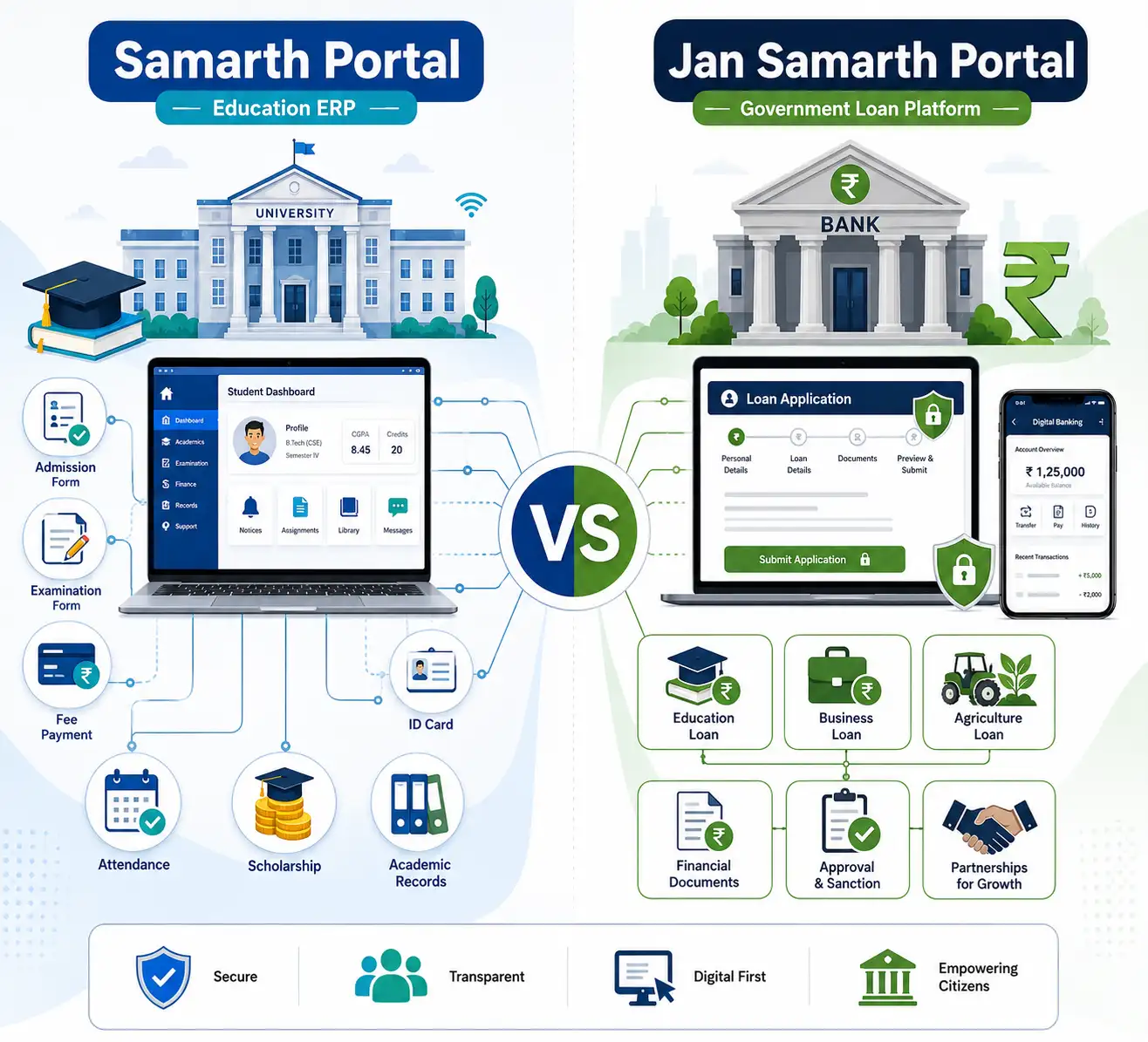
- Samarth Portal (the subject of this page) is primarily an education ERP system used by universities and colleges for admissions, examinations, student records, ID cards, and academic administration.
- Jan Samarth Portal is a completely different platform, run by the Government of India as a unified digital lending platform. It connects borrowers with lenders (mainly public sector banks) for various government-backed loan schemes, including education loans, business loans, agriculture infrastructure loans, and livelihood loans.
In short: if you are trying to submit an examination form, check your marksheet, or update your student profile, you need the Samarth Portal of your specific university. If you are trying to apply for an education loan or another government credit scheme, you need the Jan Samarth Portal, which is an entirely separate national platform under the Department of Financial Services.
Understanding the Correction Window on Samarth Portal
After submitting an application, admission form, or examination form, students often realize that certain details — such as spelling of their name, date of birth, category, or subject combination — need correction. Most Samarth Portal instances open a limited-time correction window shortly after the form submission deadline.
During this window, students can log back in, edit the flagged fields, and resubmit. It is important to complete corrections within this window because Samarth Portal typically locks the form permanently once the correction period closes, and further changes may only be possible through a formal request to the university’s academic section.
Enrollment Number and Other Common Terms on Samarth Portal
Many students search specifically for help understanding what an enrollment number is on Samarth Portal. In most cases, the enrollment number is a unique identifier assigned to a student once their admission is confirmed by the university — distinct from the temporary application or registration number generated at the time of signup. This enrollment number becomes the student’s primary identity across all future interactions with Samarth Portal, including examination forms, results, and certificate requests.
Other commonly searched terms include:
- WRN (Web Registration Number): A temporary number generated before a student is formally enrolled, used mainly during the admission and verification stage.
- ABC ID: The student’s unique Academic Bank of Credits account number, which some Samarth Portal instances allow students to link directly from their dashboard.
- Scheme Type: Refers to the specific academic programme structure (regular, distance, lateral entry, etc.) a student is registered under.
Using Samarth Portal for Examination Forms and Hall Tickets
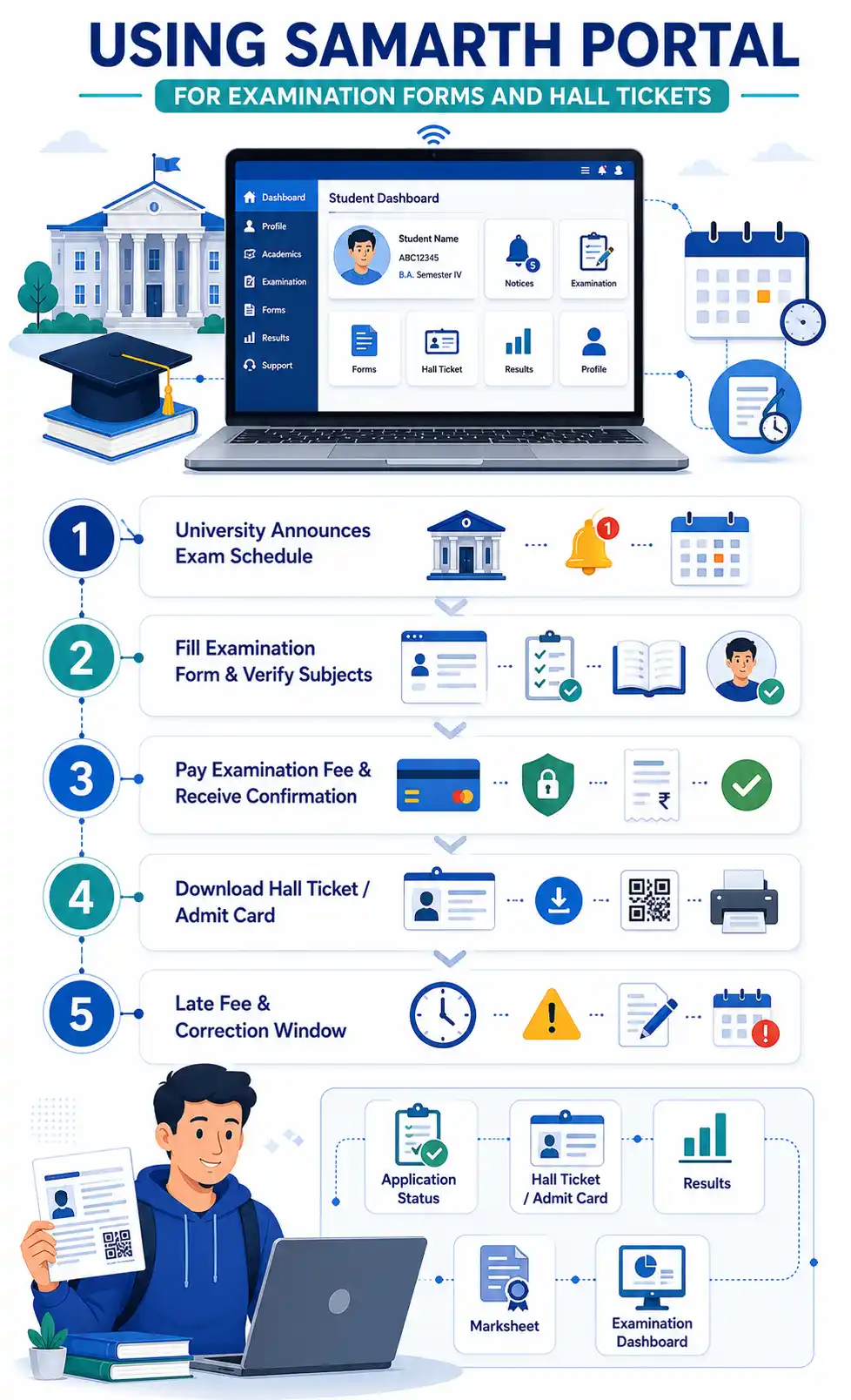
The examination form process is one of the most time-sensitive functions on Samarth Portal, and students frequently search for the last date to fill the examination form, correction window dates, and hall ticket download steps. Here’s a general overview of what to expect:
- The university announces the examination form fill-up schedule, usually through official notices linked from the Samarth Portal homepage.
- Students log in, verify their subject and course details, and pay the prescribed examination fee online.
- After submission, an acknowledgment or confirmation slip is generated — students should save or print this for their records.
- Closer to the examination date, the university uploads hall tickets/admit cards to the same portal, downloadable from the student dashboard.
- If a student misses the regular deadline, many universities open a late fee window, allowing form submission with an additional penalty fee, subject to university policy.
Because deadlines and correction windows vary by university and by academic session, students should always refer to their specific university’s official notices rather than relying solely on generic dates, since Samarth Portal is not a single centralized calendar but a collection of independently managed university instances.
Samarth Portal for Faculty and Administrative Staff
While most searches around Samarth Portal come from students, the platform also plays an important role for university staff. Faculty members use it to:
- Enter internal assessment marks and attendance
- Access teaching schedules and student lists
- Apply for leave and track approval status
- Manage academic records for the courses they teach
Administrative staff use Samarth Portal to manage admissions workflows, verify documents, process fee payments, generate reports, and coordinate examination logistics — making it a genuinely end-to-end institutional management system rather than a purely student-facing website.

Common Problems Students Face on Samarth Portal (And How to Resolve Them)
Invalid Details / Record Not Found
This usually happens when there is a mismatch between the information you are entering and what the university has on record — commonly due to typos in enrollment numbers, roll numbers, or date of birth format. Double-check the exact format your university specifies (some require DD/MM/YYYY, others MM/DD/YYYY) and confirm your enrollment number directly with your university if the issue persists.
Unable to Reset Password
If OTP or reset links aren’t arriving, check that your registered mobile number and email are still active and correctly entered. If they have changed since registration, you will likely need to raise a request with your university’s Samarth Portal support desk, since self-service email/mobile changes are often restricted for security reasons.
Documents Not Uploading
Most Samarth Portal instances have strict file size and format requirements (commonly JPEG/PNG for photos and signatures, PDF for certificates, often under 200KB–2MB per file). If your upload keeps failing, compress the file or convert it to the exact format specified in the upload instructions on the form.
Payment Deducted But Not Reflected
If your examination or admission fee was deducted from your bank account but the portal still shows payment as pending, avoid making a second payment immediately. Wait 24–48 hours, as payment gateway reconciliation can take time. If the issue isn’t resolved automatically, contact your university’s accounts or examination section with your transaction reference number.
“Samarth Portal Is Not Working” or Not Loading
During peak periods — such as the last day of examination form submission or admission deadlines — Samarth Portal instances can experience heavy traffic, leading to slow loading or timeout errors. If this happens:
- Try accessing the portal during off-peak hours (early morning or late at night).
- Clear your browser cache or try a different browser.
- Avoid submitting forms at the very last minute, since server load is highest just before deadlines.
Scholarships Through Samarth Portal
Many state governments and universities route scholarship applications through their Samarth Portal instance, particularly for schemes tied to category, income, or merit criteria. Typically, the process works as follows:
- The scholarship scheme is announced by the state’s Department of Higher Education or the university itself.
- Eligible students log in to their Samarth Portal account and locate the scholarship application section, usually under “Financial Aid” or “Scholarships.”
- Students fill in income, category, and bank account details, and upload supporting documents such as income certificates, caste certificates, and previous mark sheets.
- The application is verified at the college or department level before being forwarded to the state scholarship directorate for disbursal.
Because scholarship rules and deadlines differ significantly by state and scheme, students should always cross-check dates against their state’s Department of Higher Education notices rather than assuming a single all-India deadline applies.
Downloading Your ID Card and Marksheet from Samarth Portal
Once your profile and admission are confirmed, most Samarth Portal instances allow you to generate and download key documents directly:
- Student ID Card: Usually found under a “My Profile” or “ID Card” tab. The system pulls your uploaded photograph and admission details to generate a printable card, which you may need to get physically laminated or verified at your department office.
- Provisional Marksheet: After results are declared, a provisional or semester-wise marksheet becomes available for download in PDF format from the “Results” or “Academic Records” section.
- Final Marksheet / Transcript: Some universities issue final consolidated marksheets or transcripts through Samarth Portal as well, though others still require students to collect these physically from the examination department.
If a downloaded document shows incorrect details, do not use it for official purposes until the error has been corrected through your university’s examination or academic section, since most institutions do not accept self-corrected documents.
Attendance Tracking on Samarth Portal
Several universities use Samarth Portal to digitize day-to-day attendance as well. Faculty mark attendance for each lecture or practical session, and students can view their subject-wise attendance percentage directly from their dashboard. This is particularly useful because most universities have minimum attendance requirements (commonly 65–75%) to be eligible to sit for examinations, and having real-time visibility helps students track their standing throughout the semester rather than being surprised close to exam time.

Login Troubleshooting Checklist
If you’re having trouble accessing your university’s Samarth Portal, work through this checklist before reaching out to support:
- Confirm you are on the correct URL — search for your university’s official website and navigate to Samarth Portal from there, rather than typing a guessed web address.
- Check your internet connection and try switching between Wi-Fi and mobile data if the page isn’t loading.
- Clear browser cache and cookies, or try an incognito/private browsing window.
- Try a different browser (Chrome, Firefox, or Edge) if the portal appears visually broken or buttons aren’t responding.
- Double-check your username format — some universities expect your registered email, others expect your enrollment or application number.
- Wait and retry during off-peak hours if the issue seems to be server load rather than a personal account problem, especially close to deadlines.
- Contact your department or examination cell directly if none of the above resolves the issue, since only university staff can make backend account corrections.
Glossary of Common Samarth Portal Terms
- ERP (Enterprise Resource Planning): The broader category of software Samarth Portal belongs to — systems that integrate multiple administrative functions into one platform.
- eGov Suite: The umbrella term sometimes used to describe Samarth’s collection of interconnected modules (admissions, examinations, HR, etc.).
- ABC ID: A student’s unique account number under the Academic Bank of Credits system, used to store and transfer academic credits between institutions.
- CUET (Common University Entrance Test): A national-level entrance exam whose scores many Samarth Portal-linked universities use for UG and PG admissions.
- Correction Window: The limited period after form submission during which students can edit previously submitted details.
- WRN (Web Registration Number): A temporary reference number issued before formal enrollment is confirmed.
- Hall Ticket / Admit Card: The document generated through Samarth Portal that permits a student to sit for their examinations, usually containing their photograph, roll number, and exam centre details.
- IA (Internal Assessment): Marks awarded by faculty for coursework, assignments, and class participation, entered directly into Samarth Portal.
Best Practices for Using Samarth Portal Smoothly
To avoid last-minute stress during admissions, examination form submission, or result checking, keep the following habits in mind:
- Register early rather than waiting until the final day of any deadline, since server traffic peaks sharply in the last 24–48 hours of any window.
- Keep your documents ready in advance — scanned photographs, signatures, and certificates in the correct file format and size — so you aren’t scrambling to convert files while the form deadline is ticking down.
- Save every acknowledgment slip and payment receipt generated by the portal, either as a PDF download or a screenshot, in case you need to raise a dispute later.
- Double-check every field before final submission, especially your name, date of birth, and category, since corrections after the window closes can involve lengthy manual processes.
- Bookmark your specific university’s Samarth Portal URL rather than relying on search engines each time, to avoid accidentally landing on an incorrect or outdated link.
- Keep your registered mobile number and email updated, since OTPs, password resets, and important notices are typically sent through these channels.
Why Samarth Portal Matters for the Future of Indian Higher Education
As India’s higher education system continues to expand and modernize under the National Education Policy 2020, platforms like Samarth Portal are becoming the digital backbone connecting millions of students, faculty members, and administrators. By standardizing processes like admissions, examinations, credit tracking, and student records across hundreds of institutions, Samarth Portal reduces paperwork, minimizes errors, and gives students transparent, real-time access to their own academic journey — whether they are studying at a large central university or a smaller state institution.
Whether you’re searching for your specific university’s Samarth Portal, trying to fill out an examination form, checking your results, or simply trying to understand what the platform is and how it works, the core idea remains the same: Samarth Portal exists to make higher education administration simpler, faster, and more transparent for everyone involved.
Frequently Asked Questions About Samarth Portal | अक्सर पूछे जाने वाले प्रश्न


Final Notes
Because Samarth Portal is deployed independently by each university, always make sure you are accessing your own institution’s official Samarth Portal link rather than a generic or third-party website claiming to be “the” Samarth Portal. When in doubt, navigate to it directly through your university’s official website rather than clicking on unfamiliar links, and keep your login credentials, enrollment number, and registered contact details up to date to avoid access issues during critical deadlines like examination form submission and result declaration.